 Calc
Image Height Calculator – Magnification m = −di/do and Image Size
 Created by David Okafor · Physics Writer · Waves & Light · Last updated: November 2026
Use this free Image Height Calculator to find how tall an image a lens or mirror produces. Enter the object height and the object and image distances, and it works out the magnification m = −di/do, the image height hi = m × ho, and whether the image is real or virtual, upright or inverted.
Position is only half of what an optical system decides; the other half is size. A camera engineer needs to know whether a face will fill the sensor or rattle around in a corner of it; a projectionist needs the picture to land exactly on the screen, neither cropped nor lost in the middle; a microscope user needs to convert a measured image back into the true size of a cell. All of those questions reduce to one ratio — the magnification — and one multiplication: hi = m × ho. This calculator performs both, starting from the two distances that fix m.
The magnification formula m = −di/do deserves a second look, because it says something surprising: the size of the image depends only on where the image forms relative to where the object stands — not on the lens's focal length directly, not on the object's size. Double the image distance (by moving the object closer to the focal point) and you double the image, whatever the lens. The minus sign riding in front is equally informative: it is the algebraic shadow of the rays crossing at the image, and it marks every real image as inverted before you have drawn a single ray.
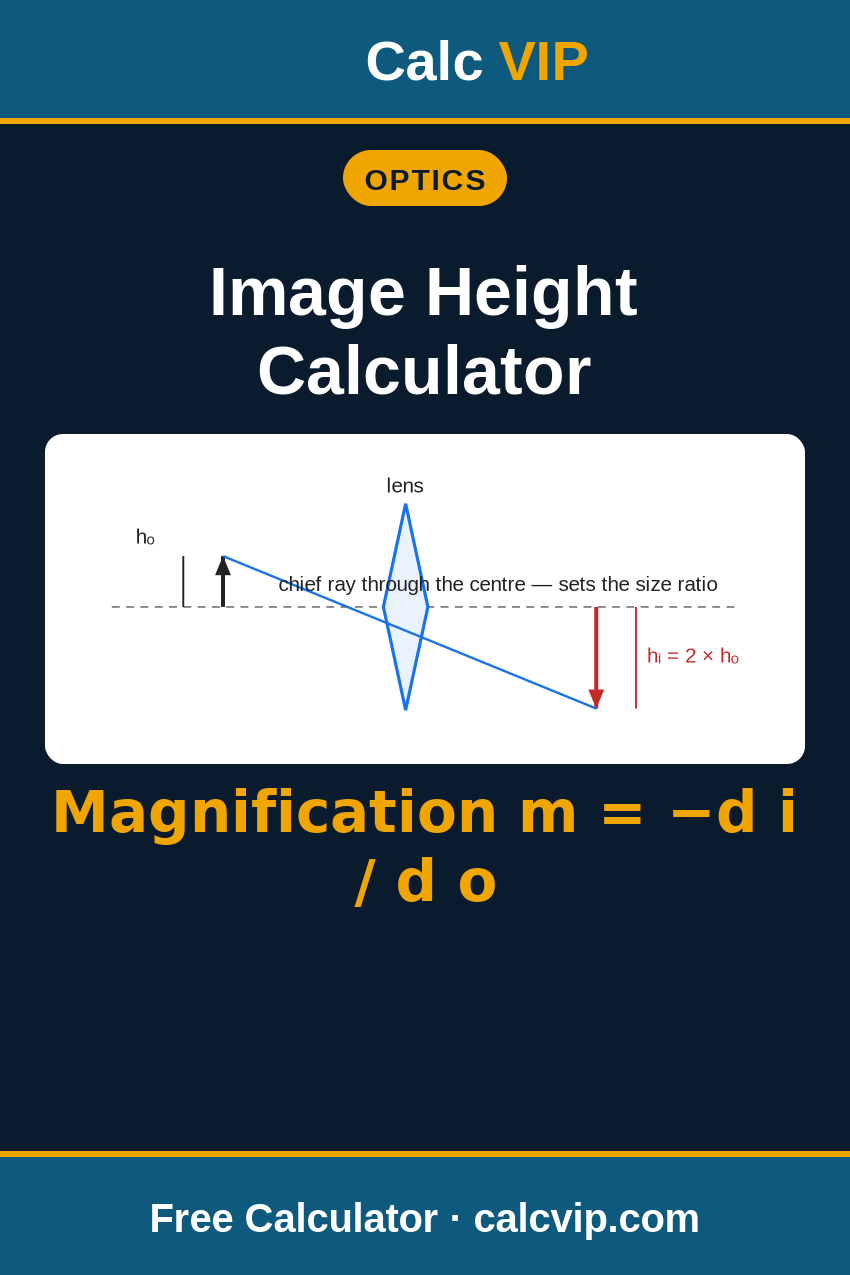
This tool deliberately starts from the distances rather than the focal length, because that is how images are usually met in practice: you know where the object is and where the screen, sensor or virtual image sits, and you want the size. If instead you know the lens and the object position, find di first with the lens or mirror equation solver, then return here — the two calculators are designed as consecutive steps of one workflow, exactly as a ray diagram would be drawn.
Formula
Magnification m = −di / do • image height hi = m × ho • rearranged: ho = hi / m and di = −m × do
The rearrangements earn their keep. ho = hi/m is the measuring direction — how microscopists and astronomers turn an image size back into a true size. di = −m × do is the design direction: demand a magnification (a 12× enlargement for a cinema screen, a 0.01× reduction for a camera sensor) and it tells you the image distance the optics must deliver, from which the lens equation then fixes the focal length. The same ratio governs widths as well as heights — magnification is a property of the whole image, so a 5 cm tall object at m = −2 also doubles in width, and its area grows fourfold.
| Symbol | Meaning | Units & signs |
|---|---|---|
| ho | object height | cm (any unit); always positive |
| hi | image height | same unit as ho; − means inverted |
| m | magnification, hi/ho = −di/do | no units; |m| > 1 enlarged, < 1 diminished |
| do, di | object and image distances | cm; di + real, − virtual |
One ray explains the whole formula
Why should image size be governed by a ratio of distances? Draw the single ray that passes through the centre of a thin lens: it emerges undeflected, travelling in a straight line from the top of the object to the top of the image. That straight line is the hypotenuse of two similar triangles — one with height ho and base do, the other with height hi and base di. Similar triangles share ratios, so hi/ho = di/do in size; and because the image's top lies on the opposite side of the axis from the object's top, the signed ratio picks up its minus. The magnification formula is not a convention or a fit to data — it is one straight ray and Euclid.
The same picture explains the trade every optical designer lives with. To enlarge the image you must either move the object closer (shrinking the object-side triangle's base) or let the image form further away (stretching the image-side base). Both moves push the object towards the focal point, where the geometry turns extreme: at do = f the image flees to infinity at infinite size, and just inside f it reappears as a virtual image on the object's side. Enlargement is bought with working distance, always, and the exchange rate is this formula.
How to use
- Enter the object height in centimetres.
- Enter the object distance do and the image distance di (use a negative di for a virtual image). If you don't know di yet, find it first with the mirror or lens equation.
- Click "Calculate Image Height" to get the magnification, the image height, and a description of the image.
- Read hi's sign as orientation: negative means inverted, and the image's true height is |hi|. Any consistent unit works — millimetres in, millimetres out.
Worked examples
Example 1 — the textbook image. A 5 cm tall object stands 30 cm from a lens, and its image forms 60 cm away on the other side.
m = −di/do = −60 ÷ 30 = −2.
hi = m × ho = −2 × 5 = −10 cm — the image is 10 cm tall, inverted, and real (di is positive), so it can be projected onto a screen.
Example 2 — a portrait on a camera sensor. A person 180 cm tall stands 5 m (500 cm) from a camera whose 50 mm lens focuses at di = 5.05 cm.
m = −5.05 ÷ 500 ≈ −0.01, so hi ≈ −1.82 cm. The whole person occupies 18 mm of a 24 mm-tall full-frame sensor — the arithmetic behind "stand closer to fill the frame".
Example 3 — the magnifying glass. A 2 cm line of small print is viewed through a lens held 6 cm from the page, so the virtual image forms on the object's side at di = −15 cm.
m = +15 ÷ 6 = +2.5, hi = +2.5 × 2 = +5 cm — upright, enlarged, virtual: the only kind of image that helps you read.
Example 4 — the security mirror's bargain. A convex mirror forms a virtual image at di = −40 cm of a 100 cm tall display standing 200 cm away.
m = +40 ÷ 200 = +0.2, hi = +20 cm. Everything shrinks fivefold — that is the price, and the point: a whole aisle compressed into one small upright image.
Example 5 — the projector's payoff. A micro-display 3.5 cm tall sits 13 cm from a projector lens that throws its image 156 cm to the screen.
m = −156 ÷ 13 = −12, hi = −12 × 3.5 = −42 cm. A hand-sized picture becomes a wall-sized one; the negative sign is why the source is mounted upside down (or flipped in software).
Example 6 — life-size. An 8 cm specimen is copied at do = di = 40 cm.
m = −40 ÷ 40 = −1, hi = −8 cm: exactly life-size, inverted — the 1:1 setting of macro photography and photocopier optics, and the symmetric midpoint of every lens's range.
Image height in real life
Sensor and film formats. Camera design is image-height budgeting: the lens must deliver an image circle covering the sensor's diagonal, and the subject's image height (Example 2) must fit its height. "Crop factor" is just a statement about how much of the image height a smaller sensor keeps.
Cinema screens. A projector's throw is chosen from this formula run backwards: fix the screen height and the micro-display height and m is fixed; di = −m × do then dictates the lens and booth position. Example 5 is a cinema shrunk to a bench.
Measuring cells under a microscope. A cell whose image measures 4 mm at a total magnification of 400× is really 4 ÷ 400 = 0.01 mm = 10 µm across. ho = hi/m is the working formula of every histology lab.
Photocopiers and scanners. The reduction/enlargement buttons on a copier are preset magnifications — 71%, 100%, 141% are chosen so A-paper sizes map onto each other — and the lens inside slides to the di that delivers the selected m at life-tested precision (Example 6 is its 100% setting).
Head-up displays and VR headsets. Virtual images (positive m, negative di) are sized by this same arithmetic: the micro-display's height and the target virtual image size set the eyepiece geometry, which is why headset optics are designed backwards from a desired apparent size.
Astronomical imaging. The Moon's image at a telescope's focal plane is a real image whose height follows hi ≈ f × θ — for a 1,000 mm lens and the Moon's 0.5° (0.0087 rad), about 8.7 mm. Whether it fits your sensor is this calculator's question with di ≈ f.
Quick reference: reading a magnification at a glance
| m | Image | Where you meet it |
|---|---|---|
| −0.01 | real, inverted, 100× smaller | landscape photo on a sensor |
| −0.25 | real, inverted, quarter size | group portrait, copy stand |
| −1 | real, inverted, life-size | 1:1 macro, photocopier at 100% |
| −12 | real, inverted, 12× enlarged | projector |
| +0.2 | virtual, upright, diminished | security mirror, door peephole |
| +2.5 | virtual, upright, enlarged | magnifying glass, shaving mirror |
The sign pattern in that table is a law of single-element optics: real images are always inverted (negative m), virtual images from a single lens or mirror are always upright (positive m). Any calculation that breaks the pattern has an error in it — a free error-check built into the formula.
Magnification multiplies: systems of elements
When light passes through several optical elements in turn, each forms an image that becomes the next element's object, and the total magnification is the product of the individual ones: mtotal = m1 × m2 × … A camera lens that delivers m = −0.01 followed by a projector lens at m = −12 gives an overall −0.01 × −12 = +0.12 — upright overall, because two inversions cancel. The microscope is the famous product: objective × eyepiece. This calculator handles one stage; chain it, multiplying as you go, and it handles any system — keeping track of each stage's di sign is the only bookkeeping required.
Depth magnification: the squared law behind "telephoto compression"
This page's m stretches heights and widths; a different power of it stretches depth. If the lateral magnification is m, distances along the axis are magnified by m² (in the same medium) — the longitudinal magnification. At the projector's m = −12, depth intervals inflate 144-fold, one reason projected images have such unforgiving focus. At a camera's m = −0.01, depth compresses by 0.0001, squeezing a deep scene onto the sensor's plane. The famous "telephoto compression" of a distant crowd is the same arithmetic read socially: photographed from far away, every subject sits at nearly the same do, so their magnifications — and image heights — are nearly equal, and near and far objects stack up at similar sizes. Nothing about the lens changed; the distances, and this formula, did it all.
The practical moral cuts both ways: to make a foreground subject loom over a background, do not reach for a longer lens — move closer and let the ratio of the two do values do the looming. Image height is controlled from the photographer's feet at least as much as from the lens barrel.
Common mistakes
- Forgetting that m needs di's sign. Using |di| makes a magnifier's virtual image come out "inverted". The sign of di is data, not noise: negative for virtual, and it must flow into m.
- Reporting a negative height as the answer. hi = −10 cm means "10 cm tall, inverted". Heights quoted as sizes are absolute values; the sign belongs to the description.
- Assuming a bigger object gives a bigger m. Magnification contains no ho at all — it is set purely by the two distances. A mountain and a matchstick at the same do share the same m.
- Mixing units between h and d. m is a ratio, so it is unit-free only if di and do share a unit; hi then inherits ho's unit. Millimetres for distances and centimetres for heights in one sum is a quiet way to be wrong by ten.
- Expecting half-covering a lens to halve the image height. Every part of the lens images the whole object; covering half dims the image but leaves hi and its position untouched.
FAQ
Why is the image height negative in the example?
The negative sign is not a size — it is a direction. It records that the image points the opposite way to the object, i.e. it is upside down. The actual height is the absolute value, 10 cm.
How can I tell if the image is real or virtual from the numbers?
Look at di. Positive → real image, formed where the light actually converges, catchable on a screen. Negative → virtual image, formed where the light only appears to diverge from, visible only by looking through the lens or into the mirror.
What does a magnification between 0 and 1 mean?
The image is smaller than the object — diminished. Camera lenses and convex security mirrors live in this range, while |m| greater than 1 means an enlarged image, as in projectors and magnifying glasses.
Does magnification apply to width as well as height?
Yes — a single m scales the whole image in both dimensions (that is what "linear magnification" means), so areas scale by m². An m = −2 image has twice the height, twice the width and four times the area of the object.
How do I find the image height if I only know f and do?
First run the lens or mirror equation to get di from f and do, then return here with that di. The two-step chain — equation for position, ratio for size — is the complete method for every single-lens or single-mirror problem.
Can magnification be zero?
Effectively, for a very distant object: di settles at f while do grows without bound, so m → 0 and the image shrinks to a point at the focal plane. Stars are the everyday example — finite objects never quite reach it.
Why do phone photos of the Moon look so small?
The Moon's image height at the focal plane is roughly f × θ: with a phone's f ≈ 4 mm and the Moon's angular size 0.0087 rad, hi ≈ 0.035 mm — a speck on a 6 mm-tall sensor. It is this formula, not the camera's quality, that makes the Moon tiny; longer f is the only cure.
What is the difference between linear and angular magnification?
This page's m is linear: image size ÷ object size, for images formed at definite places. Telescopes and magnifiers used by eye are rated by angular magnification: how much bigger the object appears. The two are related but not interchangeable — the telescope and microscope calculators on this site use the angular kind.
Does the image height change if I use a bigger lens of the same f?
No. Aperture controls brightness and resolution, not size: hi is fixed by the distances alone. A wider lens collects more light for the same image — it is brighter, not bigger.
How accurate is the similar-triangles result for real lenses?
For paraxial rays and thin (or well-corrected) lenses it is effectively exact — it is a geometric identity, not an approximation fitted to data. Thick multi-element lenses keep it true by measuring distances from their principal planes.